Solar CCTV for Construction Sites: A Practical Guide
Plan solar CCTV for temporary construction sites: size loads, compare backhaul options, secure equipment, and recommission systems after every move.
By Maxsol Team

Solar CCTV for construction sites works best as a modular, relocatable system rather than a permanent installation. Begin with the required camera coverage and daily energy load, then select the solar power, battery, mounting, enclosure and backhaul around the current construction phase—not just the final site layout.
Every relocation should be treated as a small recommissioning project. New walls, scaffolding, cranes, stored materials and temporary offices can change sunlight, camera views and wireless paths, so installers should recheck solar exposure, connectivity, security and recording before returning the system to service.
Map temporary surveillance requirements
A temporary CCTV design should follow the construction programme. Coverage that is useful during excavation may become irrelevant once access roads, storage areas and building entrances move.
Start by identifying what the system must observe during each phase:
- Site entrances and delivery points
- Perimeter gaps and temporary fencing
- Fuel, tools and high-value material storage
- Heavy equipment parking areas
- Temporary offices and worker access points
- Newly completed floors or structures awaiting handover
- Areas with limited lighting after working hours
For each location, record the viewing objective, camera type, mounting position, operating schedule and expected relocation date. Also decide whether recording will occur locally, at a site office or through a remote network connection.
| Construction stage | Typical surveillance priority | Likely installation change |
|---|---|---|
| Site preparation | Entrances, excavation zones and equipment | Poles may move as access routes change |
| Structural work | Material storage, cranes and active work fronts | New concrete and steel structures may block sunlight or radio paths |
| Building enclosure | Doors, windows and internal access | Cameras may move from perimeter to building-mounted positions |
| Fit-out | Tools, finished areas and contractor access | More indoor or semi-covered locations may require different power planning |
| Handover | Completed entrances and remaining temporary assets | Temporary equipment may be removed or integrated into the permanent system |
Include movement plans in the initial design. A modular camera pole may be quick to reposition, but the system could still require a different solar-panel location, longer cable path or new backhaul direction after the move.
Document equipment ownership and identification as well. Construction sites have frequent contractor turnover, and an unlabelled battery box or radio can easily be disconnected, moved or mistaken for another trade’s equipment.
Budget camera, radio and night loads
Size the power system from an energy budget, not only from the camera’s headline wattage. Solar CCTV construction sites often have variable loads because infrared illumination, heaters, radios, switches and converters do not consume the same power throughout the day.
List every continuous and intermittent load:
- Camera daytime consumption
- Camera night or infrared consumption
- Wireless bridge, cellular modem or router
- PoE switch or power converter
- Local recorder, if installed at the pole
- Enclosure fans, heaters or other accessories
- Conversion and cable losses
- Any planned additional camera
Use watt-hours per day rather than watts alone:
Daily energy in Wh = device power in W × operating hours
Hypothetical load example
The following figures are design assumptions only, not measured product performance:
- One camera: 8W for 12 daytime hours and 14W for 12 night-time hours
- One radio: 7W continuously
- Supporting network equipment: 5W continuously
- Design allowance for conversion and cable losses: 15%
The assumed daily demand would be:
- Camera:
(8W × 12h) + (14W × 12h) = 264Wh - Radio:
7W × 24h = 168Wh - Network equipment:
5W × 24h = 120Wh - Subtotal:
552Wh - With the hypothetical 15% allowance: approximately
635Wh per day
This does not establish the battery or panel size by itself. The design must also account for charging conditions, expected periods of reduced solar input, battery discharge limits, controller behaviour and the actual efficiency of every conversion stage.
The Maxsol CS12060 120W, 60Ah, 768Wh solar system is one selection example. Its documented configuration includes a 120W monocrystalline panel, 12.8V 60Ah 768Wh LiFePO4 battery, MPPT controller and three DC 12V outputs; RS485 is optional. The 768Wh value is nominal battery energy and must not be treated as fully usable delivered energy or as a guarantee of 24/7 runtime.
Before specifying any solar system, confirm the current controller limits for PV voltage, current and power, together with battery charging-temperature requirements and protection settings. Do not assume that a panel’s rated wattage will be available continuously at a construction site.
Check PoE compatibility separately
A DC-powered site does not automatically support every PoE camera. Confirm:
- Required camera voltage
- Maximum and peak camera power
- Connector polarity
- Ethernet pinout
- PoE protocol or powering method
- Cable length and voltage drop
- Whether powered-device detection or negotiation is required
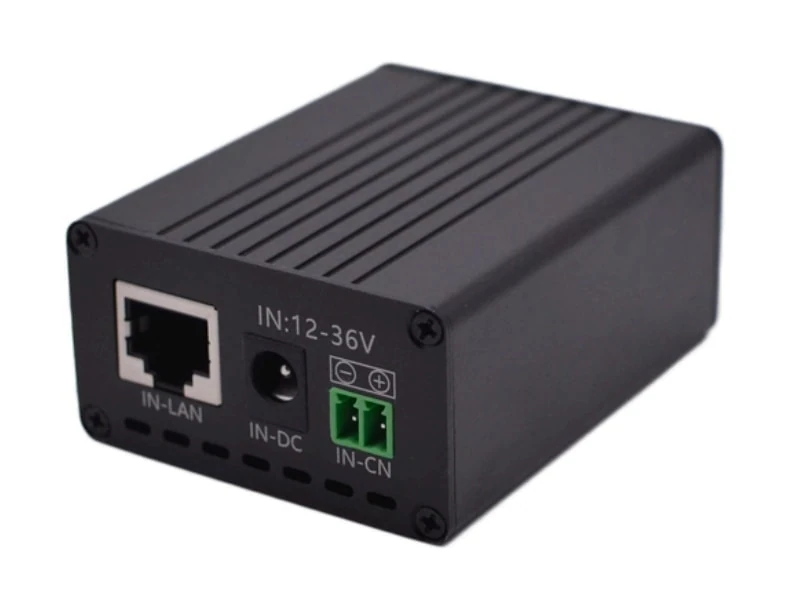
The Maxsol POE24V DC-to-PoE converter accepts 12–36V DC and provides an adjustable 12–57V PoE output, Gigabit Ethernet and an LCD voltage display. Its documented continuous load for 12V-to-48V conversion is no more than 30W. A maximum conversion efficiency of up to 94% should not be used as a guaranteed design value.
IEEE powered-device detection or negotiation is not established by the available product facts. Installers must therefore verify voltage, polarity, pinout, protocol and camera compatibility before connection.
Choose connectivity for a changing site
The correct backhaul depends on where the recording destination is located and how the construction layout will change. Cellular and point-to-point or point-to-multipoint wireless links solve different problems.
| Consideration | Cellular connection | Wireless bridge |
|---|---|---|
| Main requirement | Suitable network coverage and compatible service | Clear radio path to a connected building or network point |
| Dependence on site infrastructure | Low, aside from power and local signal conditions | Requires a reachable network endpoint |
| Effect of new structures | May affect signal quality depending on placement | Walls, steelwork, cranes and scaffolding can obstruct the path |
| Relocation work | Recheck signal, antenna position and service connectivity | Realign radios and revalidate line of sight |
| Ongoing commercial factors | Confirm plan, data limits and service terms | Confirm equipment, mounting and network-management requirements |
| Best fit | Isolated or frequently changing camera positions | Sites with a stable office, control room or network hub |
Cellular can simplify deployment where no site network is available, but it still requires a signal survey and a realistic data plan. Continuous high-resolution video, event clips, health monitoring and remote playback can have very different data requirements. Confirm the modem’s operating voltage and include it in the daily load calculation.
A wireless bridge may avoid dependence on a local cellular signal, but it needs a usable path between endpoints. The route that is clear during groundworks may later be blocked by a completed wall, metal cladding, a tower crane or temporary material stacks.
The Maxsol CPE295 5.8GHz wireless CPE documents 5.8GHz operation, a 2×2 14dBi directional MIMO antenna, one Gigabit LAN port, IEEE 802.3af/at or 9–48V DC power support, and 6.5W full-load consumption. Product range and wireless-rate labels do not guarantee usable distance or application throughput. Verify line of sight, interference, mounting alignment and applicable local radio rules.
For phased developments, identify a stable backhaul anchor—such as a temporary site office or completed structure—that is less likely to move than the cameras. If no stable anchor exists, plan how the backhaul will be changed and who will reconfigure addressing, routing and recording after relocation.
Plan modular mounting and secure enclosures
Temporary does not mean lightly secured. Solar panels, batteries, cameras and radios remain exposed to theft, accidental impact, dust, rain, cable damage and unauthorised disconnection.
A practical modular installation usually separates four functions:
- Camera viewing position
- Solar collection position
- Battery and controller enclosure
- Radio or cellular antenna position
These parts may share one pole when conditions permit, but they do not always need to. For example, the best camera angle may be under a roof edge while the solar panel requires a nearby open position. Separating them can improve performance, although longer cables introduce voltage-drop and protection considerations.
Use mounting hardware that can be relocated without becoming easy to remove. Depending on the site, this may include tamper-resistant fasteners, lockable cabinets, protected cable entry, elevated equipment placement and barriers against vehicle impact. Avoid leaving exposed connectors or spare cable loops within easy reach.
Plan for lifting and handling. A complete power enclosure may be too heavy or awkward for one person, even if the camera pole itself is portable. Record safe isolation steps and identify which assemblies must be disconnected before transport.
For power, fibre, battery and equipment-box planning, refer to this outdoor PoE switch box and power system guide. It covers broader enclosure architecture without treating a temporary construction system as a single sealed component.
Ingress protection and impact resistance also need separate consideration. An IP rating addresses protection against solid objects and water, while an IK rating addresses mechanical impact; neither automatically guarantees protection from theft, poor cable glands, condensation or incorrect installation. Use the detailed IP65 and IK10 outdoor CCTV enclosure comparison when selecting housings rather than relying on a single rating.
Common temporary-installation mistakes include:
- Mounting the solar panel where future floors or scaffolding will shade it
- Placing batteries where floodwater, excavation runoff or vehicle traffic can reach them
- Routing cables across temporary access paths
- Using the radio mast as an unsecured lifting point
- Failing to provide drip loops and strain relief
- Installing lockable boxes that cannot be serviced without removing the entire pole
- Leaving factory-default network credentials in place
- Assuming all DC and PoE connectors with similar shapes are compatible
Recheck solar exposure after each relocation
A solar survey expires when the surroundings change. On an active construction site, shading can appear even when the panel itself has not moved.
Possible sources include:
- Newly built walls and upper floors
- Tower cranes and lifting equipment
- Scaffolding and safety netting
- Temporary offices and storage containers
- Stockpiled steel, formwork or aggregates
- Signboards, fencing and covered walkways
- Dust, cement residue and other surface contamination
Assess exposure over the expected operating period, not only at the exact time of installation. A panel that is clear during a midday inspection may be shaded earlier or later in the day. Partial shade can also affect charging even when only part of the panel is obstructed.
After moving the system:
- Inspect the new horizon and likely future construction.
- Confirm panel orientation and tilt for the actual mounting position.
- Check that the panel is mechanically secure.
- Inspect the surface for dirt or damage.
- Verify open-circuit and operating values using appropriate procedures.
- Confirm controller status and battery condition.
- Observe charging under the available conditions.
- Update the site drawing and next relocation date.
Do not judge solar adequacy from one voltage reading. A battery may initially show an acceptable voltage while the system is receiving insufficient daily energy to recover from overnight use. Review charging over a representative operating period and compare energy input with the measured load.
Where construction shading is unavoidable, the proper response may be to move the panel, separate it from the camera pole, reduce the supported load or revise the energy design. Do not assume that a larger nominal battery alone will correct an ongoing charging deficit.
Commission and hand over the temporary system
Initial commissioning and post-relocation recommissioning should follow the same controlled process. A camera producing an image is not enough; power recovery, night operation, recording and backhaul must also be verified.
Power and solar checks
- Record panel, controller, battery and load details.
- Confirm polarity before energising equipment.
- Measure actual device consumption in daytime and night modes.
- Check voltage at the load end of long cables.
- Confirm controller settings against the battery requirements.
- Test low-voltage behaviour without deliberately damaging the battery.
- Verify that the system resumes normal operation after a controlled shutdown.
Camera and recording checks
- Confirm the field of view and identify new obstructions.
- Check focus, image orientation and time settings.
- Test night mode and infrared loading.
- Verify motion or analytics zones after the camera has moved.
- Confirm recording destination, retention configuration and playback.
- Check that event timestamps match the recording system.
Network and backhaul checks
- Record IP addresses, device names and management access.
- Test stable throughput rather than relying only on a link indicator.
- Confirm remote health monitoring where configured.
- Check radio alignment or cellular signal at the final mounting height.
- Verify recovery after power interruption.
- Change credentials and remove unnecessary services.
Mechanical and security checks
- Tighten mounts and mark inspected fasteners.
- Lock enclosures and control key access.
- Protect cable routes from equipment and pedestrians.
- Check glands, seals, vents and drainage paths.
- Photograph the finished installation for the handover record.
- Update the asset register with the new location.
The handover pack should state that the system is temporary and identify the events requiring another review, such as a pole move, new floor construction, backhaul change, major scaffolding work or additional camera load. It should also include isolation instructions, approved relocation points, cable diagrams, login-management procedures and responsibility for periodic panel cleaning and inspection.
Linked components should be treated as selection examples, not as a tested compatible bundle. As a practical next step, compare the linked Maxsol models against the project’s camera and port count, measured daily load, backhaul distance, available DC power, environmental exposure and network-management requirements. Confirm current datasheets and the supplied configuration before final specification.