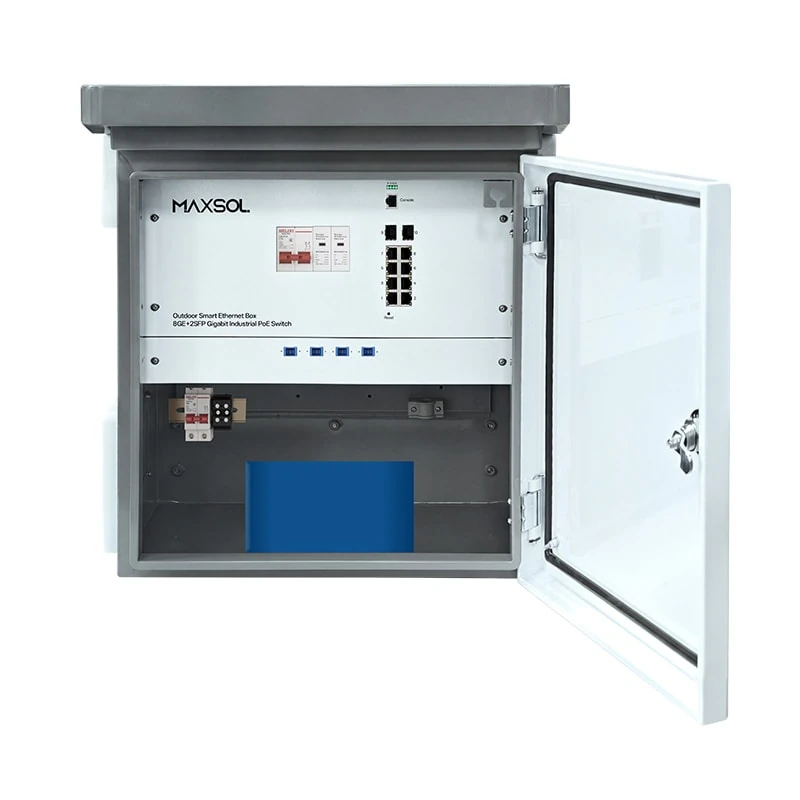
Outdoor PoE Switch Box with Battery Backup: PH Guide
Choose an outdoor PoE switch box for CCTV and wireless sites in the Philippines. Compare enclosure protection, fiber uplinks, UPS and battery needs.
By Maxsol Team

An outdoor PoE switch box with battery backup can simplify a CCTV, Wi-Fi or point-to-point wireless installation by bringing switching, power distribution and protected equipment housing together at the field location. It is most useful where a long PoE run is impractical, fibre is needed between buildings, or a short power interruption would take cameras and access points offline.
For Philippine deployments, select the box by starting with the actual connected load, site exposure, fibre route and expected power interruptions—not merely the number of PoE ports. An IP-rated enclosure, correctly sized AC supply, suitable surge-protection plan and realistic battery runtime calculation all matter. A battery does not provide a fixed number of backup hours; runtime changes with the load, battery condition, temperature and power-conversion losses.
Why integrate switching and power outdoors
A conventional arrangement may require a separate switch, power supply, backup unit, surge protector and cabinet. An integrated outdoor PoE box reduces the number of separate enclosures and interconnections at a pole, perimeter wall, gatehouse, rooftop or remote building.
This approach can be practical for sites such as:
- Perimeter CCTV installations with multiple IP cameras in one zone
- Parking areas, loading bays and entrance gates
- Campus or warehouse networks where fibre terminates near outdoor devices
- Outdoor Wi-Fi coverage points powered from a local network node
- Solar or hybrid power designs where DC power planning is centralised at the field cabinet
- Temporary or expanding project sites where a structured, weather-resistant node is required
An integrated box does not remove the need for proper design. It simply groups key functions into one installation point. The incoming AC circuit still needs appropriate isolation and protection. Copper Ethernet leaving the enclosure still requires careful surge-risk planning. Fibre cables still need correct termination, bend-radius control and compatible optics.
For a typical eight-device zone, an eight-port PoE box can offer a neater layout than placing an indoor switch in an improvised cabinet. However, leave spare ports and power capacity where future cameras, access points or wireless bridges are likely.
Enclosure and environmental checks
The enclosure is the first consideration for an outdoor switch box. The network features are of little value if moisture, heat, dust or poor cable entry damages the installation.
Check the IP rating in context
IP65 is a useful rating for outdoor equipment because it indicates protection against dust ingress and water jets. It does not mean the box can be submerged, pressure-washed at close range, installed with the door open, or used with poorly sealed cable glands.
For example, the managed SBOX2802SFG-I and the unmanaged SBOX1802SFG-I are specified as IP65 units. Keep that protection intact by checking the entire installed system, not only the enclosure label:
- Use cable glands that match the cable outside diameter.
- Tighten and seal unused entries with suitable blanking plugs.
- Form drip loops so water does not track along cables into glands.
- Avoid upward-facing cable entries where possible.
- Check the door gasket for debris, twisting or damage before closing.
- Use mounting hardware appropriate for the pole, wall or frame material.
- Keep the cabinet clear of places prone to standing water or direct flood exposure.
Plan for heat, sunlight and condensation
An IP65 enclosure is sealed against dust and water, which also means airflow is limited. Direct afternoon sun can substantially increase internal temperature. Mount the box where it has shade when possible, while maintaining safe access and cable routing.
Avoid installing it immediately beside heat-producing equipment or where reflected heat from a metal roof or concrete wall is severe. If a site experiences large day-to-night temperature changes, inspect for condensation risks and follow the enclosure manufacturer’s installation guidance.
Do not assume that a higher power supply rating solves heat concerns. PoE load, charging activity, cable losses and local ambient conditions all contribute to internal temperature.
Check cable and fibre entry requirements
Before ordering or installing, prepare a cable schedule:
- Number of camera, AP or bridge drops
- Cable category and outside diameter for each PoE run
- Fibre count, jacket type and termination method
- Required SFP module type and fibre connector type
- Incoming AC cable route and protective earth arrangement
- Spare entries for future expansion
The smart boxes in this guide have two Gigabit SFP slots, giving installers an option to use fibre uplinks rather than extending copper between buildings or across exposed outdoor paths. Confirm the SFP type, fibre mode, connector, distance rating and network design before installation. “Gigabit SFP” describes the slot capability, not the optic required for every link.
Managed versus unmanaged switching
The choice between managed and unmanaged switching depends on how much visibility and control the project needs after commissioning.
A managed switch is usually more suitable where an installer or network team needs to segment services, monitor link status, apply network policy or troubleshoot remotely. An unmanaged switch is often appropriate for a straightforward, fixed device group where simple deployment and local controls are sufficient.
When a managed outdoor PoE box is the better fit
Managed switching is useful for multi-camera systems, shared site networks and projects where a fault must be isolated without visiting every field box. Layer 2 management can support structured network administration, but the exact available functions should always be confirmed against the current product documentation and project requirements.
The SBOX2802SFG-I managed industrial smart Ethernet box combines eight Gigabit PoE ports, two Gigabit SFP slots, Layer 2 management, AC100–240V input and a built-in 240W DC55V UPS module in an IP65 enclosure.
Choose this type of unit when the project needs:
- Eight PoE-connected endpoints in one outdoor zone
- Fibre uplink capability
- Layer 2 switch management
- AC input at the cabinet location
- A UPS-ready architecture, with the backup arrangement confirmed for the final design
Management should not be treated as a substitute for sound network design. Define IP addressing, VLAN structure, uplink redundancy requirements, camera traffic flows and access control before commissioning.
When an unmanaged box is sufficient
An unmanaged switch box can be a sensible choice for a small, self-contained cluster of devices where the uplink, ports and power demand are known and no ongoing switch configuration is needed.
The SBOX1802SFG-I industrial smart Ethernet box is an IP65 unmanaged unit with eight Gigabit PoE ports, two Gigabit SFP slots and a 300W power supply. It also has DIP-selectable watchdog, isolation, VLAN and priority functions, plus QoS.
These DIP-selectable features can be helpful in field deployment, but they are not equivalent to full Layer 2 management. Confirm exactly how each mode affects the intended topology before enabling it. In particular, VLAN or isolation settings must match the uplink and device-access requirements; otherwise, installers may lose reachability to cameras or local devices.
Avoid this common selection mistake
Do not choose an unmanaged box solely because the installation has “only cameras.” A group of cameras may still require VLAN separation, remote diagnostics or controlled uplink behaviour. Conversely, do not specify managed switching where no one will configure, document or maintain it. The right choice is based on the operating model of the site.
UPS and battery-backup requirements
A UPS module and a battery are related, but they are not the same thing. The UPS manages continuity of DC power during an input interruption, while the battery stores energy. A complete backup design must consider both the switching equipment and every powered endpoint.
Start with the real PoE load
List each connected device and its expected consumption. Use the manufacturer’s normal and maximum power figures where available. Include cameras with heaters, IR illumination, pan-tilt-zoom movement or other variable loads, as these may draw more power in particular operating conditions.
A practical load worksheet should include:
| Load item | What to record |
|---|---|
| PoE endpoint count | Cameras, APs, bridges and other devices connected now and later |
| Per-device power | Typical and peak wattage, not just a nominal figure |
| Switch consumption | Power used by the switching hardware itself |
| Uplink equipment | Media converters, wireless radios or other local equipment, if powered from the same backup source |
| Growth allowance | Reasonable reserved capacity for future endpoints |
| Peak operating condition | Night-time IR, rain conditions, high wireless traffic or camera movement where applicable |
Compare the result with the PoE power budget and total available power of the selected unit. The 300W power supply listed for the SBOX1802SFG-I is a power-supply rating; it is not a guarantee that all 300W is available to attached endpoints under every configuration. Verify the PoE budget, per-port limits and operating conditions before finalising the design.
Understand 288Wh battery capacity
The battery-equipped SBOX2802SFG-I-288WH managed smart Ethernet box adds a built-in 48V 6Ah, 288Wh LiFePO4 battery. This can reduce the need to design a separate internal battery arrangement for an installation that requires integrated backup.
A basic first-pass runtime estimate is:
Estimated runtime (hours) ≈ usable battery energy (Wh) ÷ total load (W)
For illustration only, if a complete load were 72W and the full nominal 288Wh were usable, the arithmetic result would be four hours. Actual runtime will differ. Do not use this calculation as a guaranteed backup duration.
Usable energy may be lower than nominal battery energy because of:
- DC conversion and UPS losses
- Battery management limits
- Battery age and state of health
- Ambient and internal enclosure temperature
- Changing PoE demand, especially from cameras at night
- The switch’s own operating load
- Battery charge state before an outage
For critical surveillance or wireless links, design to the required minimum continuity period with margin. Then validate the result under realistic operating load after installation.
Confirm the behaviour during power loss
Backup requirements are not only about runtime. Ask the following before specifying the equipment:
- What devices must remain online during an outage?
- Is the objective to bridge brief brownouts, support several hours of outage, or enable a controlled shutdown?
- Does the site have generator or solar charging support?
- What is the expected recharge behaviour after mains power returns?
- What alarms, monitoring or maintenance checks are required?
- Does every necessary device receive backup power, including the upstream fibre terminal or radio?
A field box may keep local cameras powered while the upstream network equipment has no backup. In that case, recordings or remote viewing can still be interrupted. Treat backup as an end-to-end system requirement.
Provide for safe AC and surge protection
The SBOX2802SFG-I is specified for AC100–240V input, so verify that the available supply, circuit protection, earthing arrangement and cable installation suit the product documentation and local site conditions. Installation should be carried out by qualified personnel.
Outdoor equipment may face surge exposure from nearby lightning activity, long copper routes and electrical switching events. A robust plan generally considers:
- Protection at the AC supply entry
- Proper protective earthing and bonding
- Surge-protection devices selected for the power and network design
- Minimising exposed copper cable runs where practical
- Fibre uplinks between buildings or distant zones where appropriate
- Inspection after severe electrical events
Surge protection is a system design issue. Adding a device without correct earthing, cable routing and coordination may not provide the intended protection.
Compare three Maxsol smart boxes
The following comparison is limited to the verified product information available for these models. Confirm current documentation for PoE budgets, dimensions, temperature range, battery operation, SFP compatibility and all other project-critical details.
| Consideration | SBOX2802SFG-I | SBOX2802SFG-I-288WH | SBOX1802SFG-I |
|---|---|---|---|
| Switching type | Layer 2 managed | Layer 2 managed | Unmanaged |
| Enclosure rating | IP65 | IP65 | IP65 |
| PoE ports | 8 Gigabit PoE ports | 8 Gigabit PoE ports | 8 Gigabit PoE ports |
| Fibre uplinks | 2 Gigabit SFP slots | 2 Gigabit SFP slots | 2 Gigabit SFP slots |
| AC input | AC100–240V | AC100–240V | Check the model specification |
| UPS information | Built-in 240W DC55V UPS module | Built-in 240W DC55V UPS module | Check the model specification |
| Battery | No built-in battery specification provided here | Built-in 48V 6Ah 288Wh LiFePO4 battery | No built-in battery specification provided here |
| Power supply | Built-in 240W DC55V UPS module | Built-in 240W DC55V UPS module | 300W power supply |
| Other stated functions | Layer 2 management | Layer 2 management and integrated battery backup | DIP-selectable watchdog, isolation, VLAN and priority; QoS |
The battery-equipped option is the natural starting point when integrated LiFePO4 backup is a firm project requirement. The managed SBOX2802SFG-I is relevant where Layer 2 management and a built-in UPS module are priorities, with the final backup configuration to be verified. The SBOX1802SFG-I suits applications that prefer an IP65 unmanaged platform with stated DIP-selectable field functions and a 300W power supply.
Installation planning checklist
Use this checklist before purchase, site mobilisation and commissioning.
Site and enclosure
- Confirm the mounting surface, height, access method and maintenance clearance.
- Identify direct sun, rain exposure, flood risk, dust and heat sources.
- Plan cable entries, drip loops, strain relief and gland sealing.
- Verify the enclosure can be installed without exceeding cable bend-radius limits.
- Ensure the location is accessible for battery inspection or eventual replacement where applicable.
Network and fibre
- Count current endpoints and reserve ports for reasonable expansion.
- Confirm device PoE requirements and peak operating demand.
- Select compatible SFP modules and the correct fibre type for each uplink.
- Document the fibre route, connector type, splice or patching arrangement and labelling.
- Decide whether VLAN segmentation, isolation or managed diagnostics are needed.
- Confirm uplink capacity for aggregate camera and wireless traffic.
Power, backup and protection
- Confirm the incoming AC voltage and dedicated circuit arrangement.
- Size the power design against peak—not average—PoE load.
- Calculate backup duration from realistic total load and include a safety margin.
- Confirm what equipment beyond the switch box needs backup power.
- Plan protective earthing, bonding and coordinated surge protection.
- Check whether a generator, solar charger or other source affects the battery-recharge plan.
Commissioning and handover
- Label every port, cable, fibre pair and circuit.
- Test all PoE endpoints under normal and high-load conditions.
- Verify fibre link status and network connectivity.
- Test the intended response to a controlled mains interruption where safe to do so.
- Record the configured management settings or DIP-switch positions.
- Provide the maintenance team with an inspection schedule.
Frequently asked questions
Can a 288Wh battery run eight PoE cameras for a full day?
Usually, that cannot be assumed. Eight cameras can have widely different power needs, and night-time IR operation can increase consumption. Divide usable battery energy by the complete actual load to estimate runtime, then allow for conversion losses and battery condition. Validate the result on the final installation.
Is fibre necessary for an outdoor PoE switch box?
Not always. Fibre is especially useful where the uplink crosses between buildings, covers a longer route, or needs electrical isolation from a copper network path. The best option depends on distance, topology, existing infrastructure and surge-risk design.
Does IP65 mean no additional installation protection is needed?
No. IP65 helps protect the enclosure from dust and water jets, but installation details remain critical. Correct glands, sealed unused entries, drip loops, secure mounting, safe power wiring and surge protection are still required.
Should I choose managed switching for a CCTV system?
Choose managed switching if the system needs functions such as structured Layer 2 control, segmentation, ongoing diagnostics or easier remote troubleshooting. For a simple fixed set of devices with no management requirement, an unmanaged unit may be more appropriate.
Compare the linked Maxsol models against your required port count, PoE load, fibre distance, AC power arrangement, outdoor exposure and management needs before selecting the final outdoor switch box.