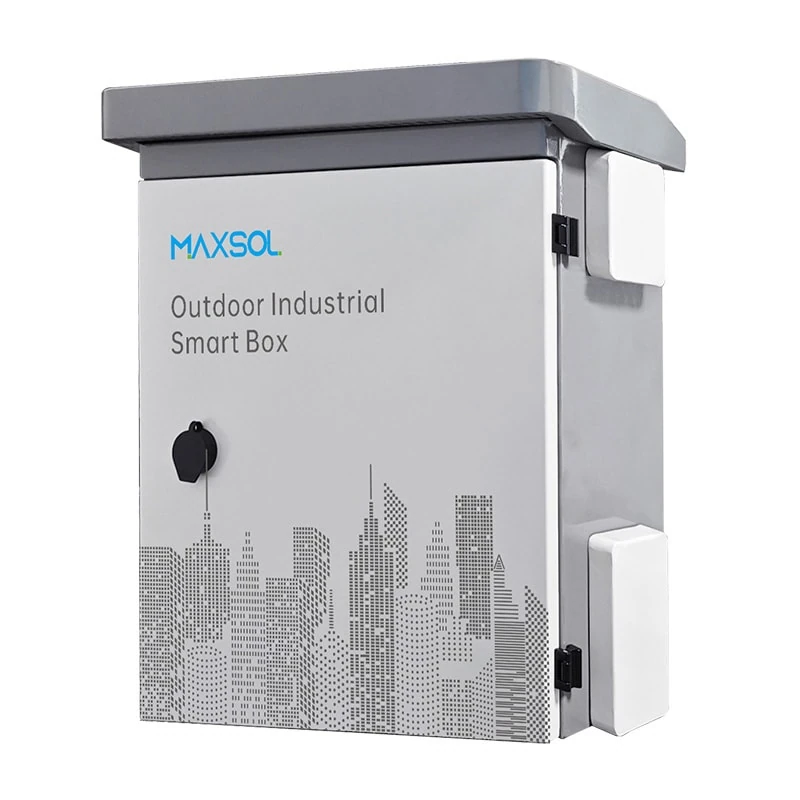
IP65 and IK10 CCTV Enclosures: A Practical Guide
Understand IP65 and IK10 ratings for outdoor CCTV enclosures, then choose the right size, material, mounting, cable entry and cooling plan.
By Maxsol Team

An IP65 IK10 outdoor CCTV enclosure addresses two separate risks: water and dust entering the box, and physical impact against its housing. IP65 helps protect installed equipment from dust and water jets, while IK10 indicates a high level of impact resistance. Neither rating alone confirms that an enclosure is the right choice for every outdoor CCTV installation.
For Philippine projects, selection should begin with the equipment layout, cable routing, mounting surface and sun exposure. A correctly rated box can still develop problems if it is overcrowded, has poorly sealed cable entries, traps heat or is mounted where it is difficult to inspect.
IP and IK ratings answer different questions
The IP and IK codes are often written together on an outdoor enclosure, but they describe different protective characteristics.
IP means Ingress Protection. Its two digits indicate protection against solid objects and water:
- The first digit, 6, means dust-tight protection.
- The second digit, 5, means protection against water jets from different directions.
Therefore, an IP65 enclosure is designed to keep dust out and resist water jets. It should not be assumed to be suitable for submersion, prolonged flooding or pressure-washing at very close range. The actual performance of the installation also depends on the door gasket, cable glands, conduit joints, unused openings and how the door is closed after servicing.
IK refers to resistance against mechanical impact. IK10 is a high impact-resistance classification, commonly associated with a 20-joule impact level under the relevant test method. It is useful where an enclosure may be accidentally struck, exposed to rough handling or located in areas with a higher vandalism risk.
Here is the practical distinction:
| Question | Rating to review | What it helps address |
|---|---|---|
| Will wind-driven rain, dust or wash-down water enter the box? | IP rating | Ingress of dust and water |
| Can the enclosure housing withstand a strong physical strike? | IK rating | Mechanical impact |
| Will the box survive standing water or flooding? | Not answered by IP65 alone | Requires a site-specific design review |
| Will the camera, switch or power supply inside tolerate heat and humidity? | Not answered by IP or IK alone | Depends on internal equipment and thermal design |
| Will cable entry points remain sealed after installation? | Installation method | Depends on glands, plugs, conduits and workmanship |
For an outdoor CCTV cabinet, IP65 and IK10 can be a sound starting point where both weather exposure and impact risk matter. However, the ratings apply to the enclosure as specified and tested. Drilling extra holes, fitting the wrong gland size, leaving a knockout open or damaging a gasket can reduce the practical protection of the completed installation.
Measure the equipment and cable space
An enclosure should contain more than the main device. Before selecting one, make a layout that includes the CCTV equipment, power components, wiring bends, service clearance and future additions.
Typical items inside an outdoor surveillance enclosure may include:
- PoE switch or industrial Ethernet switch
- Fibre termination or media converter
- Power supply, surge protection or DC distribution components
- Battery and charging equipment for an off-grid or backup-powered site
- Terminal blocks, DIN rails and cable management
- Wireless bridge equipment or monitoring controls, where required
Measure external dimensions and usable working space separately
External enclosure dimensions do not automatically equal usable internal space. Door structure, mounting plates, cable ducts, component depth and bend radius all consume room. Obtain the actual internal layout information before committing to equipment placement.
For example, the Maxsol IB542 IP65 IK10 outdoor smart box measures 500 × 400 × 200 mm. Its 200 mm depth may suit compact combinations of network and power equipment, but depth should be checked carefully if using devices with protruding connectors, large power adapters or cable loops.
The Maxsol IB552 IP65 IK10 outdoor smart box measures 550 × 450 × 280 mm. Its larger dimensions can provide more allowance for component separation, wiring routes and maintenance access. It is still important to validate the final equipment arrangement rather than selecting by height and width alone.
Allow room for cable bend radius and servicing
CCTV, network and fibre cables must not be sharply bent or pinched against the enclosure door. Leave adequate space for:
- The manufacturer’s required fibre bend radius, if fibre is installed
- RJ45 plug clearance and strain relief
- Drip loops before cable entry, where the cable routing allows
- Separation between AC and low-voltage wiring where applicable
- A technician’s access to terminals, fuses, switches and labels
- Door swing and clearance so cables do not pull when the door opens
A frequent specification mistake is choosing an enclosure that technically fits the equipment but leaves no working space. This makes troubleshooting slower and increases the chance of loose connections, damaged conductors or improperly resealed cable entries.
Plan for growth, but avoid empty oversized boxes
Leaving some spare capacity is good practice when later expansion is realistic, such as adding cameras, a larger PoE switch or a solar power controller. However, an unnecessarily large enclosure may cost more, occupy more pole area and create additional internal air volume to manage.
As a practical approach, prepare a component schedule with each device’s width, height, depth, cable exit direction, power requirement and heat output. Lay it out on a scaled drawing before installation.
Compare steel and ABS enclosure options
Material choice affects impact resistance, mounting method, corrosion management, internal temperature and the type of installation the box is intended to support. There is no universally better material; the appropriate choice depends on the site and installed components.
| Consideration | Galvanized steel enclosure | ABS enclosure |
|---|---|---|
| Physical robustness | Often selected where a rigid, high-impact housing is needed | Can be suitable for many distribution and control applications, subject to its stated impact rating |
| Impact rating in the documented options | IB542 and IB552 are rated IK10 | IP652 is rated IK09 |
| Documented weather protection | IP65 for IB542 and IB552 | IP65 for IP652 |
| Weight and handling | Generally heavier | Generally lighter |
| Grounding considerations | Metallic housing requires a deliberate protective bonding approach where applicable | Non-metallic housing does not provide a metal enclosure body for bonding, but internal electrical components may still require earthing |
| Heat behaviour | Can absorb solar heat and conduct heat differently depending on finish and installation | Can also warm significantly in direct sun; assess installed equipment temperatures |
| Typical decision driver | Strong impact protection and steel construction | A non-metallic option for distribution, junction, control, battery or monitoring arrangements |
The documented IB542 and IB552 units use 1.2 mm galvanized steel with powder coating. Their IP65 and IK10 ratings make them relevant where the project calls for a dust-tight, water-jet-resistant and high-impact enclosure. Outdoor performance still depends on installing and maintaining the cable entries, locks, seals and mounting points properly.
For applications where an ABS housing is a better fit, the Maxsol IP652 plastic distribution box measures 600 × 500 × 220 mm and has a 4 mm ABS housing. It is rated IP65 and IK09, and is documented for junction, distribution, battery, control and monitoring uses. Its lower stated impact rating than IK10 should be included in the site risk assessment rather than overlooked.
Consider the actual exposure, not just the material label
In the Philippines, outdoor CCTV equipment may face intense sunlight, heavy rainfall, high humidity, airborne dust and salt-laden air in coastal locations. These conditions do not automatically make one material appropriate for all sites.
Check the specific installation conditions:
- Is the enclosure in direct afternoon sun?
- Is it exposed to rain from one direction due to prevailing wind?
- Is the site near the coast, an industrial process or a dusty road?
- Could it be hit by carts, vehicles, sports equipment or deliberate vandalism?
- Will it be mounted under an eave, on an open pole or inside a guarded compound?
- Can it be inspected regularly for damage, corrosion, loose glands and condensation?
A rating is one part of the selection. Site exposure and maintenance access are equally important.
Plan wall or pole mounting
Mounting affects both enclosure security and weather performance. A stable mount helps prevent vibration, loose fittings and stress on cable glands.
The IB542 and IB552 are documented to support wall or pole mounting, allowing the mounting approach to follow the site layout. Confirm the mounting hardware, pole diameter range, load capacity and installation method for the final project, as these details can vary by mounting accessory and site structure.
Wall mounting considerations
Wall mounting may be suitable for building perimeters, gatehouses, warehouses and utility rooms with an external wall. Before installation:
- Confirm that the wall structure can support the enclosure and all internal equipment.
- Choose anchors appropriate for concrete, masonry, steel or other wall material.
- Maintain a level installation unless the enclosure instructions specify otherwise.
- Leave clearance around the door for opening, servicing and cable routing.
- Avoid locations directly below roof runoff, leaking gutters or air-conditioner drain lines.
- Route cables so water does not track directly into the glands.
Where possible, locate the box at a serviceable height. Placing it very high may reduce casual interference, but it can make routine inspection and emergency repair more difficult.
Pole mounting considerations
Pole mounting is common for perimeter cameras, roadway surveillance, wireless links and solar-powered CCTV installations. It can reduce trenching and place network equipment closer to the camera cluster, but it needs careful mechanical planning.
Check these points before specifying a pole-mounted enclosure:
- Pole material, diameter, shape and structural condition
- Wind loading on the enclosure, cameras, antennas and solar equipment
- Clamping method and compatibility with the selected bracket
- Clearance from vehicle paths and potential impact zones
- Ability to open the door fully without hitting the pole or cable loops
- Cable protection on the pole, particularly at reachable heights
- Safe access for installers and maintenance personnel
Do not use the enclosure itself as the only support for heavy external equipment unless the enclosure documentation and mounting design specifically allow it. Cameras, antennas, solar panels and cable trays may need their own rated supports.
Cable entry, grounding, cooling and maintenance
The enclosure body is only one layer of protection. Most real-world water ingress issues start at cable entries, unused holes, damaged gaskets or incomplete reassembly after maintenance.
Select cable glands and seals as part of the enclosure system
Every cable entry should be planned according to cable diameter, jacket type, conduit arrangement and the required protection level.
Good cable-entry practice includes:
- Use correctly sized, weather-appropriate cable glands rather than improvised sealant alone.
- Fit approved blanking plugs to unused entries.
- Ensure each gland grips the cable jacket, not only the individual conductors.
- Avoid over-tightening glands to the point of damaging the cable jacket or thread.
- Form a drip loop where cables approach from above, if routing permits.
- Avoid making unplanned holes in the door, roof or lower sections of the enclosure.
- Keep conduit connections secure and sealed at the enclosure boundary.
If field drilling is necessary, follow the enclosure manufacturer’s guidance and use appropriate sealing hardware. A new opening can compromise the rated protection if not prepared and sealed correctly.
Ground metal enclosures correctly
A metal enclosure may require protective bonding or grounding as part of the electrical design, particularly where mains-powered equipment, surge protection devices or metallic cable containment are present. The exact arrangement should follow the project’s electrical design and applicable local requirements.
Do not assume that mounting an enclosure to a metal pole automatically provides a reliable earth path. Paint, corrosion, clamps and mechanical joints can interrupt continuity. Verify the earthing path intentionally and test it as required by the project.
For CCTV systems exposed to lightning-prone weather, grounding, bonding and surge protection should be designed as a coordinated system. An enclosure rating does not replace surge protection or correct earthing.
Manage heat before the equipment fails
IP65 limits dust and water ingress, which also means the enclosure is not simply open to free airflow. Internal heat can build up due to PoE switches, power supplies, battery systems, solar charge controllers and direct sun.
Review:
- Total heat generated by installed equipment
- Maximum operating temperature of each device
- Solar exposure during the hottest part of the day
- Internal spacing between heat-generating devices
- Whether a shaded position, sunshield, spacing from the wall or other passive measure is possible
- Whether a ventilation or cooling method would affect the desired ingress protection
Do not add ordinary vents or fans without reviewing their effect on the enclosure’s protection level. Cooling solutions need to be selected as a complete system, including filters, sealing, power consumption and maintenance needs.
Inspect on a planned schedule
Outdoor CCTV enclosures benefit from routine checks, especially after severe weather or site work. A basic inspection can include:
- Door gasket condition and door closure
- Cable gland tightness and signs of cracking
- Unused openings and blanking plugs
- Water marks, condensation or insect activity inside the enclosure
- Corrosion, coating damage or loose mounting hardware
- Cable strain, abrasion and UV deterioration
- Grounding and surge-protection connections, where fitted
- Dust buildup and evidence of heat stress on internal devices
- Updated labels, circuit identification and service records
Never open an electrical enclosure during unsafe weather conditions or without following the required isolation procedures.
Selection checklist
Use this checklist when comparing an IP65 IK10 outdoor CCTV enclosure with other options:
- Does the stated IP rating match the expected dust and rain exposure?
- Is IK10 necessary for the likely impact or vandalism risk, or is a different impact rating acceptable?
- Are flooding, standing water or submersion risks present that IP65 does not address?
- Does the enclosure provide sufficient internal space for all devices, wiring bends and service access?
- Have you checked usable depth, not only the external dimensions?
- Is the material appropriate for the location, mounting method and impact exposure?
- Is the enclosure suitable for wall or pole mounting at the chosen location?
- Have the mounting structure, brackets, anchors and wind loading been assessed?
- Are all cable glands, plugs and conduit fittings matched to the cable sizes and environmental requirement?
- Is there a clear plan for grounding, bonding and surge protection where relevant?
- Can the enclosed equipment stay within its allowed operating temperature?
- Is there a maintenance route for opening, inspecting and servicing the box safely?
- Have future network ports, power load, battery capacity or camera expansion been considered?
Common mistakes when specifying outdoor CCTV enclosures
Treating IP65 as a flooding rating. IP65 concerns dust and water jets. It does not mean the enclosure can sit in floodwater or be submerged.
Selecting by enclosure size only. A box may fit a switch but not its connectors, power supply, surge protection, fibre loops and technician access.
Using the same cable gland for every cable. Cable diameter and cable type matter. A poorly matched gland can allow water ingress or fail to provide strain relief.
Ignoring solar gain. Even a well-sealed enclosure can become too hot when a heat-generating PoE device is installed in full sun.
Forgetting the installed rating is system-dependent. Open holes, loose doors, damaged gaskets and unsealed conduits can defeat the intended enclosure protection.
Choosing an impact rating without considering the site. IK10 is valuable where impact exposure is credible, but it does not remove the need for sensible location, mounting and access control.
FAQ
Is IP65 enough for an outdoor CCTV box?
IP65 is often appropriate where dust protection and resistance to water jets are required. Whether it is enough depends on the site. If the enclosure may be flooded, submerged, exposed to unusual wash-down conditions or subjected to extreme heat, assess those risks separately.
Does IK10 mean the enclosure is vandal-proof?
No. IK10 indicates a high mechanical impact resistance classification, but vandal resistance also depends on the lock, mounting, accessible fixings, cable protection, location and the force or tools involved. It should not be treated as an absolute guarantee against tampering.
Should I choose steel or ABS for a CCTV enclosure?
Choose based on impact exposure, internal equipment, mounting, heat considerations and the required rating. The IB542 and IB552 are galvanized steel IP65 IK10 options, while the IP652 is an ABS IP65 IK09 enclosure documented for junction, distribution, battery, control and monitoring uses. Compare the complete installation requirement rather than material alone.
Can I install a PoE switch and power supply in the same enclosure?
It may be possible if there is enough space, appropriate power separation, thermal allowance, grounding where required and safe service access. Confirm the operating conditions and installation instructions for every internal device before finalising the layout.
For a practical next step, compare the linked Maxsol enclosure models against your required port count, equipment load, cable distance, power arrangement, site environment and management requirements before selecting a final outdoor CCTV enclosure.