Power Outdoor PoE Cameras Without Grid Electricity
Plan an off-grid PoE camera site using solar, MPPT charging and battery storage while checking runtime, cable loss and PoE compatibility.
By Maxsol Team

To power outdoor PoE cameras without grid electricity, use a solar panel, MPPT charge controller, battery and correctly matched DC-to-PoE converter. Size the energy system from the camera’s measured day and night consumption, then verify the PoE voltage, polarity, pinout, protocol and cable losses separately.
Those are two different design checks. A battery may contain enough energy to run a camera overnight while the converter remains electrically incompatible with its PoE input. Likewise, a compatible PoE supply will not keep the site online if the solar array and battery are undersized for the cloudiest practical design period.
Map the solar energy and Ethernet data paths
Start by drawing two paths: the energy path and the data path. Keeping them separate makes it easier to identify power losses, compatibility issues and single points of failure.
Solar energy path
A typical single-camera architecture follows this sequence:
- Solar panel collects available sunlight.
- PV protection and isolation provide a suitable way to disconnect and protect the panel circuit.
- MPPT charge controller regulates panel power for charging.
- Battery storage supplies the site when solar production is low or unavailable.
- Battery-side fuse or breaker protects downstream wiring.
- DC distribution supplies the camera converter and any networking equipment.
- DC-to-PoE converter produces the voltage and connection required by the camera.
- Outdoor Ethernet cable carries power and data to the PoE camera.
Wire size, connector ratings, polarity protection, grounding and surge protection must suit the installation. Place battery-side protection close enough to the battery to protect the downstream conductor rather than only the connected device.
For an example of the overall system concept, see this guide to solar power for off-grid PoE networking.
Ethernet data path
The data route may be:
PoE camera → DC-to-PoE converter or injector → Ethernet switch/router → local recorder or wireless backhaul
If video is sent to another building or control point, the site may also need:
- a wireless CPE or bridge;
- an access point or router;
- a network switch;
- a cellular gateway where appropriate;
- a local recorder or edge storage device;
- remote monitoring equipment.
These devices must be included in the energy budget. A project often fails because the calculation covers the camera but omits the radio, router, switch, heater, illuminator or other continuously powered equipment.
The Maxsol CS12060 120W and 768Wh solar system is one architecture reference. Its documented components include a 120W monocrystalline panel, 12.8V 60Ah or 768Wh LiFePO4 battery, MPPT controller and three DC 12V outputs. These figures do not establish runtime for a particular camera, and the product should not be assumed to form a validated kit with any PoE converter.
Measure camera and auxiliary power demand
Do not size the system from the camera’s headline wattage alone. Outdoor cameras can have several operating states, and the highest sustained demand may occur at night when the solar panel is producing nothing.
Measure or confirm the following:
- daytime camera consumption;
- night consumption with infrared LEDs active;
- maximum draw during pan, tilt or zoom movement;
- heater, fan, defogger or wiper load;
- startup and reboot demand;
- PoE converter input consumption;
- switch, router and wireless backhaul demand;
- local storage or recorder consumption;
- auxiliary lighting or sensors;
- cable and conversion losses.
Use actual DC input measurements where possible. A label rating is useful for checking the maximum supply requirement, but it may not represent the camera’s normal energy use. Conversely, a short daytime measurement may miss night-time infrared or environmental loads.
Build a 24-hour load profile
Calculate energy in watt-hours rather than comparing only watt ratings:
Daily energy in Wh = watts × operating hours
For devices with changing loads, calculate each operating state separately:
Daily load = daytime Wh + night-time Wh + auxiliary-device Wh + system losses
As a purely illustrative method, suppose a camera averages 7W for 12 daytime hours and 11W for 12 night-time hours:
- Day: 7W × 12h = 84Wh
- Night: 11W × 12h = 132Wh
- Camera total: 216Wh per day
A 5W backhaul radio operating continuously would add:
- 5W × 24h = 120Wh per day
The preliminary equipment total would therefore be 336Wh per day before converter losses, cable losses, battery losses and design margin. These example values are not recommended assumptions for a real camera or radio.
Check startup demand as well as average demand
Some equipment briefly draws more current during:
- camera boot-up;
- infrared LED activation;
- motor movement;
- radio association;
- switch or router startup;
- battery recovery after a low-voltage shutdown.
The converter and wiring must support both continuous demand and temporary peaks. If every device restarts at once after battery recovery, their combined startup current can be considerably more challenging than normal steady operation.
Measure the full site during a cold start, not just after everything is already online.
Size storage and array for the design month
An off-grid system should be sized for the least favourable expected solar conditions, not the annual average. In the Philippines, prolonged cloud cover and heavy rain can materially reduce solar harvest. The appropriate design input is site-specific solar availability for the selected design month, together with the required number of days of autonomy.
A more detailed CCTV sizing workflow is available in this guide to sizing an off-grid solar power system for CCTV.
Calculate required battery storage
A basic planning relationship is:
Required usable battery energy = daily load × autonomy days
The selected battery’s nominal capacity will normally need to be higher than the required usable energy because the design must account for:
- permitted depth of discharge;
- battery management system limits;
- conversion losses;
- wiring losses;
- temperature effects;
- battery ageing;
- reserve for cloudy conditions;
- safe shutdown thresholds.
Do not assume that all nominal watt-hours are continuously usable. Confirm the battery manufacturer’s operating limits and recommended discharge range.
For example, a nominal 768Wh battery does not automatically provide 768Wh to the camera. Energy is consumed by the DC conversion stage and other electronics, while the battery management system and low-voltage settings may reserve part of the stored energy. Actual runtime depends on the complete load profile and operating conditions.
Calculate the solar array requirement
A preliminary relationship is:
Array watts = daily energy requirement ÷ design-month peak-sun-hours ÷ system derating factor
The derating factor should represent real losses such as:
- panel temperature;
- dust and dirt;
- imperfect orientation;
- shading;
- controller losses;
- cable voltage drop;
- battery charging losses;
- seasonal weather;
- equipment tolerance and ageing.
Use credible solar data for the actual project site. A roof, pole or hillside may have a different shading profile from a nearby open area. Even partial shade across a panel can reduce harvest during critical charging hours.
Check charging recovery, not only daily balance
An array may produce enough energy on an average day but still recharge too slowly after several cloudy days. Ask:
- Can the panel run the active load and recharge the depleted battery at the same time?
- How many favourable solar days are needed for recovery?
- Will the charge controller remain within its PV voltage and current limits?
- Does the design avoid repeated low-battery operation during the design month?
A system that merely breaks even each day has little ability to recover from unusually poor weather. Where uptime is important, include a deliberate recovery margin or define an acceptable load-shedding plan.
Verify converter voltage, polarity, pinout and protocol
Energy capacity and PoE compatibility must be approved independently. “Adjustable PoE voltage” does not by itself mean that a converter complies with an IEEE PoE standard or can safely power every PoE camera.
Check all of the following before connection:
| Check | What to verify | Risk if incorrect |
|---|---|---|
| Battery-side voltage | Converter input range across the battery’s full charge and discharge range | Converter shutdown or damage |
| Output voltage | Camera’s permitted PoE input voltage | Camera damage or failure to start |
| Polarity | Positive and negative conductor arrangement | Equipment damage |
| Pinout | Ethernet pairs used to carry power | No power or incorrect energisation |
| PoE protocol | Passive power or IEEE detection and negotiation | Incompatibility or unsafe voltage application |
| Continuous power | Converter output at the selected input/output voltage | Overload or unstable operation |
| Startup power | Camera inrush and peak demand | Reboot loop or failed startup |
| Cable loss | Voltage available at the camera under load | Night-time instability |
| Data rate | Required Ethernet link speed | Reduced throughput or failed link |
| Environmental rating | Enclosure, temperature and moisture suitability | Corrosion, condensation or failure |
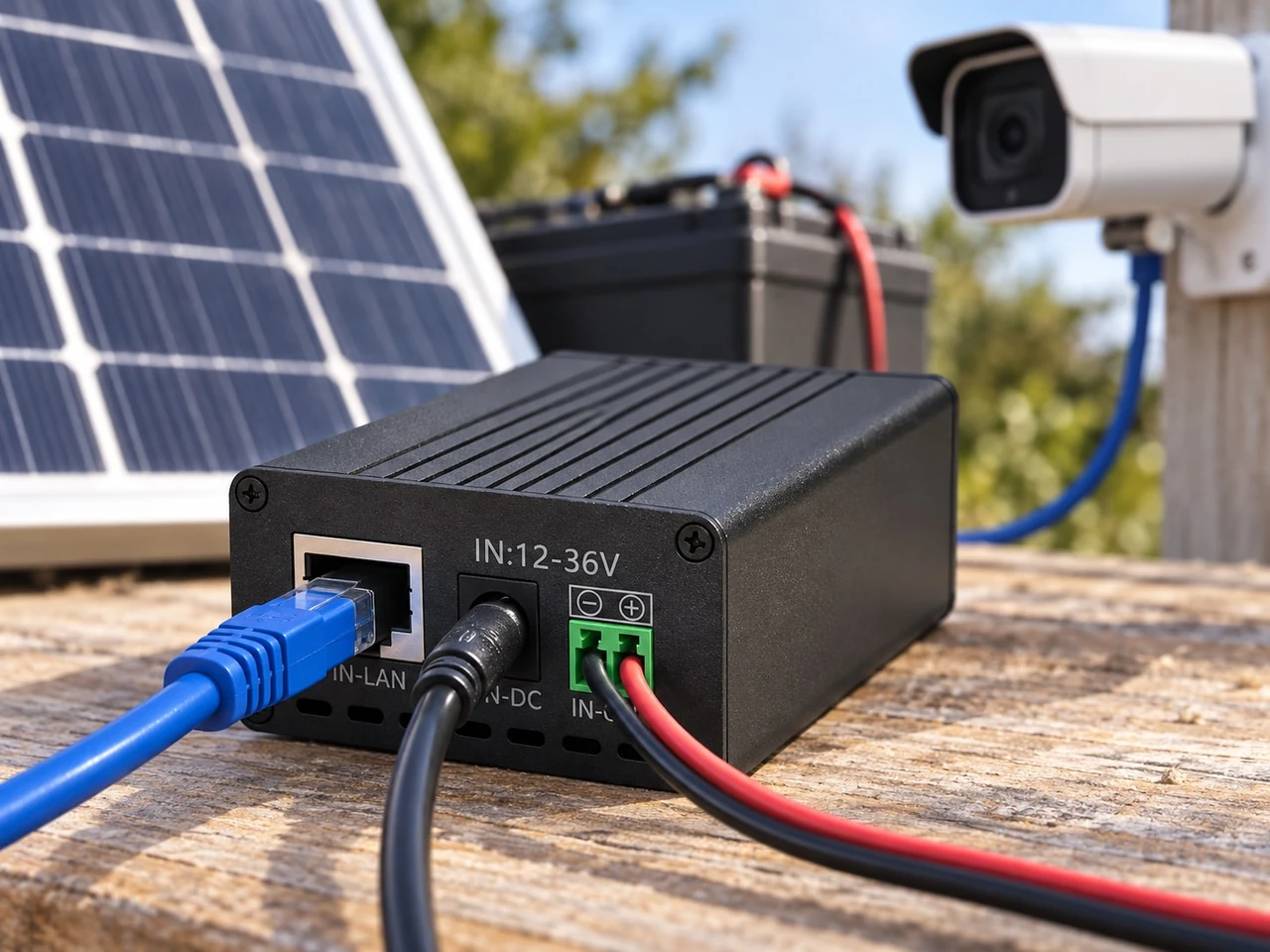
The Maxsol POE24V DC-to-PoE converter documents a 12–36V DC input, adjustable 12–57V PoE output, Gigabit Ethernet and an LCD voltage display. Its documented continuous load for 12V-to-48V conversion is no more than 30W. A maximum conversion efficiency of up to 94% should not be used as a guaranteed efficiency for every voltage and load condition.
These specifications do not establish IEEE powered-device detection or negotiation. Before connecting a camera, verify its required voltage, polarity, pinout, protocol, maximum demand and expected cable loss. The converter and CS12060 solar system are architecture examples, not a tested compatible bundle.
Account for Ethernet cable loss
Voltage falls along the cable because of conductor resistance. The effect increases with:
- cable length;
- current;
- smaller conductors;
- poor-quality or copper-clad aluminium cable;
- connector resistance;
- elevated cable temperature;
- damaged or corroded terminations.
Measure voltage at the camera end while the camera is under its highest realistic load, particularly with infrared LEDs, heaters or motors active. Measuring an unloaded output at the cabinet does not prove that sufficient voltage reaches the camera.
For outdoor installations, use cable and connectors suitable for the exposure. Route cables with drip loops, weatherproof entries and strain relief. Keep data and power equipment inside a suitable enclosure, and apply an appropriate grounding and surge-protection design for the site.
Include backhaul, monitoring and restart loads
A remote camera is useful only if video or status information can reach its destination. Include the communications layer in both the network design and the energy calculation.
Select a backhaul path
Common choices include:
- point-to-point wireless bridge;
- point-to-multipoint wireless network;
- local Ethernet connection;
- cellular router;
- local recording with periodic data retrieval.
Evaluate line of sight, required throughput, video bitrate, antenna alignment, network congestion and latency. If the camera records locally, decide whether a backhaul failure should stop recording or only prevent remote viewing.
Power the backhaul from a known and protected DC path. Do not assume that every device labelled “12V” accepts the same voltage range or connector polarity.
Monitor energy and communications separately
Useful remote measurements may include:
- battery voltage;
- charge and discharge current;
- controller operating state;
- solar charging status;
- DC output status;
- cabinet temperature;
- camera reachability;
- backhaul link quality;
- packet loss or latency;
- device uptime and reboot count.
Battery voltage alone is not always an accurate state-of-charge indicator, especially under changing load and charge conditions. Use the most appropriate information available from the battery and controller rather than relying only on a single voltage threshold.
Design predictable low-energy behaviour
When stored energy becomes insufficient, the system should shut down and recover in a controlled manner. Poorly selected thresholds can cause cycling:
- Battery voltage falls.
- Converter shuts down.
- Removing the load allows battery voltage to rebound.
- Converter immediately restarts.
- Startup demand causes another shutdown.
Repeated cycling can interrupt recording and create unnecessary stress. Check the low-voltage disconnect point, reconnect threshold, restart delay and any battery management system behaviour.
Where the architecture permits, prioritise loads. For example, non-essential auxiliary lighting might be disconnected before the camera or backhaul. Any such priority scheme must be designed explicitly rather than assumed.
Bench-test and commission before remote deployment
Assemble and test the full system before installing it on a pole, farm, construction area, perimeter or other difficult-to-access site. A bench test should use the actual camera, cable length, connectors, converter, battery-side supply and networking equipment intended for deployment.
Bench-test checklist
-
Confirm polarity with a meter.
Do not rely only on connector shape or cable colour. -
Set and verify the PoE output before connecting the camera.
Confirm voltage at the output and camera end. -
Validate the pinout and protocol.
Establish whether the camera expects passive power or IEEE PoE negotiation. -
Test the intended Ethernet cable length.
Use the real cable category and conductor type where possible. -
Measure daytime and night-mode demand.
Force infrared illumination or other night functions to operate. -
Exercise moving and auxiliary functions.
Test PTZ movement, heaters, illuminators, radios and local storage if fitted. -
Start all devices simultaneously.
Observe voltage, current and boot reliability. -
Simulate low battery.
Confirm orderly shutdown, reconnect threshold and restart delay. -
Interrupt the backhaul.
Check local recording and automatic network reconnection. -
Run a sustained load test.
Watch for converter heating, voltage sag, packet loss and unexpected reboots.
Site commissioning checks
At the installed site, verify:
- panel orientation and year-round shading;
- secure mounting and wind exposure;
- cabinet sealing and drainage;
- cable glands, drip loops and strain relief;
- protective-device ratings;
- grounding and surge-protection arrangement;
- battery terminal tightness;
- voltage at the camera under peak load;
- camera image and night operation;
- backhaul signal and throughput;
- remote monitoring and alarms;
- labels, diagrams and maintenance instructions.
Record the measured values at commissioning. Baseline battery voltage, load current, charging current, link quality and device temperature can help identify later deterioration.
Common design mistakes to avoid
The most frequent errors are architectural rather than product-specific:
- sizing from camera watts but forgetting the radio and converter;
- calculating average consumption while ignoring night load;
- treating nominal battery capacity as fully usable energy;
- sizing the panel from annual sunshine rather than the design month;
- assuming adjustable voltage means IEEE PoE compliance;
- ignoring pinout and polarity;
- selecting a converter only by maximum wattage;
- overlooking voltage drop in a long Ethernet run;
- testing without the actual cable;
- omitting simultaneous startup demand;
- allowing immediate restart after low-voltage shutdown;
- installing without monitoring or a recovery plan;
- assuming separately selected products form a validated system.
A reliable off-grid camera site comes from matching every interface: panel to controller, controller to battery, battery to converter, converter to camera, and camera to the backhaul network.
Practical selection checklist
Before approving the design, document these values:
- total daytime and night-time load in watts;
- daily energy consumption in watt-hours;
- required autonomy in days;
- design-month solar resource;
- array output after realistic derating;
- battery nominal and planned usable energy;
- controller voltage and current limits;
- battery output voltage range;
- converter input and output requirements;
- camera PoE voltage, pinout, polarity and protocol;
- continuous and startup power;
- Ethernet distance and conductor type;
- backhaul load and throughput;
- environmental protection needs;
- shutdown and restart thresholds;
- remote monitoring requirements.
As a next step, compare the linked Maxsol solar system and DC-to-PoE converter with your required port count, measured load, cable distance, power interfaces, installation environment and management needs. Confirm every electrical and PoE interface on the bench before treating the components as a complete site design.