Managed vs Unmanaged PoE Switch: A Practical Guide
Compare managed and unmanaged PoE switches for CCTV, Wi-Fi and outdoor sites. Choose based on control, VLANs, diagnostics, redundancy and cost.
By Maxsol Team

A managed vs unmanaged PoE switch decision comes down to how much visibility and control the network needs after installation. An unmanaged PoE switch is often suitable for a small, straightforward camera or access-point network where devices are on one local network and fault finding can be done on site. A managed PoE switch is more suitable when you need VLAN separation, remote monitoring, traffic prioritisation, fibre uplinks, resilience planning or easier diagnostics.
Managed hardware is not automatically the better choice for every Philippine deployment. It adds setup work and requires someone to maintain the configuration. For a small CCTV installation with a clear cable layout and limited expansion plans, an unmanaged unit may be the more practical and economical option. For multi-zone premises, outdoor cabinets, wireless backhaul points or networks that must be easier to support remotely, management features can quickly become worthwhile.
What unmanaged switches provide
An unmanaged PoE switch forwards network traffic automatically and supplies power to compatible PoE devices through the same Ethernet cable. There is typically no web interface, command line or user account to configure. Connect the uplink, connect powered devices such as IP cameras or access points, check the power budget, and the switch is generally ready to operate.
This simplicity is valuable for installations where the network design is intentionally basic. It reduces commissioning time and avoids configuration errors such as assigning the wrong VLAN or locking out management access.
An unmanaged PoE switch can be a sensible fit for:
- A small group of IP cameras connected to one NVR or local recorder
- A basic office access-point network on a single LAN
- A small guardhouse, shop, warehouse room or isolated equipment area
- A project where the installer can access the site promptly for troubleshooting
- Installations that do not require network segmentation or traffic policies
- Networks with a stable device count and no planned fibre or ring topology
However, “plug and play” does not remove the need for design checks. The installer still needs to confirm the PoE requirements of every device, the total switch power budget, cable quality, cable length, uplink capacity and environmental protection needed for the mounting location.
Useful features without full management
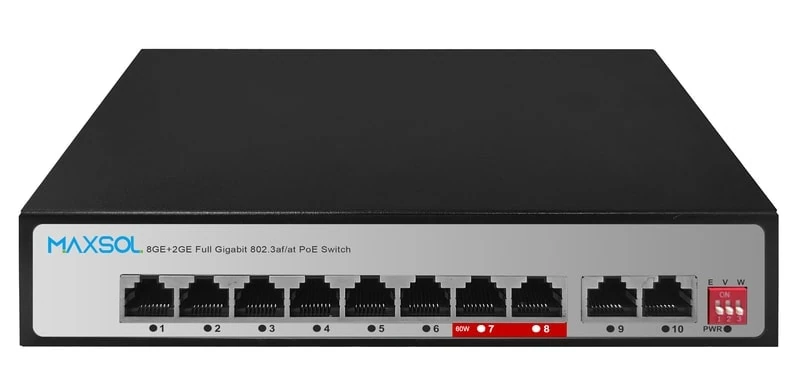
Some unmanaged switches offer physical mode selections that support common surveillance deployments. For example, the PS1802G has DIP-selectable Extend, VLAN isolation and AI watchdog modes. These modes may be useful where installers need a simple local operating option without configuring a management interface.
Physical VLAN isolation mode should not be treated as a full replacement for configurable managed VLANs. A managed VLAN design lets an administrator define groups, trunks, port membership and policies according to the network plan. A DIP mode has a fixed function, so its exact port behaviour and limitations should be confirmed before it is used in a mixed camera, PC and wireless network.
What management adds
A managed PoE switch gives the network team an interface to view, configure and control the switch. Depending on the model, this may include a web interface, SNMP monitoring, VLAN configuration, quality-of-service rules, port information, multicast controls and redundancy features.
The practical advantage is not simply having more settings. Management helps answer operational questions without immediately visiting the site:
- Is the uplink connected and negotiating at the expected speed?
- Which port is carrying a camera, access point or bridge?
- Is a particular port drawing power or showing a link issue?
- Are camera devices separated from office users?
- Is multicast traffic being controlled correctly?
- Is a fibre uplink active?
- Did a network loop or uplink failure affect a segment?
For distributed sites in the Philippines, a trip to an installation can involve travel time, access coordination and weather-related delays. Basic visibility can help narrow the fault before dispatching a technician. That said, remote management must itself be designed securely. Do not expose a switch management page directly to the public internet. Use an appropriate protected management network, strong unique credentials and a documented access procedure.
Management does not replace sound installation work
A managed switch cannot correct undersized power capacity, poor cable terminations, water ingress, overloaded uplinks or an incorrectly designed wireless link. It adds control and diagnostics, but the network still needs a proper physical design.
Before selecting a managed model, identify who will:
- Create and document the configuration.
- Maintain administrator credentials.
- Back up the configuration where supported.
- Monitor alerts or SNMP information where used.
- Restore the intended settings after replacement or site changes.
If nobody can carry out these tasks, a simple unmanaged design may be safer for a small installation than a managed switch left with unknown settings.
VLAN monitoring and redundancy questions
VLANs, monitoring and redundancy are usually the turning points in a managed versus unmanaged PoE switch comparison. They are not needed in every project, but they matter greatly when a network becomes more complex.
When VLANs matter
A VLAN separates network traffic logically even when devices share switching infrastructure. In a security system, a common approach is to separate cameras, recorders, office workstations, visitor Wi-Fi, access control and network-management devices according to the site’s requirements.
This helps limit unnecessary traffic between groups and makes the network easier to organise. It does not make a system secure by itself: routing rules, firewall policies, passwords and device hardening still matter. But VLANs provide a useful foundation for segmentation.
Ask these questions:
- Must camera traffic be separated from office or tenant traffic?
- Will one switch serve cameras, Wi-Fi access points and non-PoE devices?
- Does the uplink need to carry more than one VLAN to another switch, router or firewall?
- Is there a defined network-management VLAN?
- Does the NVR or recording server need controlled access to camera VLANs?
- Will the site grow into multiple buildings, floors or zones?
If the answer is yes to several of these, a managed switch is usually the more suitable path.
Monitoring and diagnostics
Managed switches can provide information that makes troubleshooting more methodical. Useful capabilities vary by product, so check the actual data available rather than assuming every model presents the same details.
For example, Web and SNMP management can support local configuration and integration with a monitoring approach. Features such as LLDP can help identify connected devices where both ends support it. Port-level settings can also help an installer document which connection serves each camera or wireless device.
An unmanaged switch can still be reliable, but diagnosis is generally based on physical indicators, device status pages, cable tests and on-site checks. That is perfectly workable for a small network; it becomes less convenient as the number of ports and locations grows.
Redundancy and loop control
Redundancy is relevant where losing a cable path or switch uplink would interrupt critical traffic. A managed industrial switch may support ring protocols, alternate paths or other resilience functions, but these features need compatible topology and careful configuration.
ERPS, for example, is intended for Ethernet ring protection in an appropriately designed ring. It is not a feature to enable casually on an ordinary star network. Incorrect redundancy or loop settings can create broadcast storms and widespread disconnection.
Consider redundancy if:
- Cameras cover a high-priority perimeter or operational area.
- A site has multiple cabinets or buildings linked by fibre.
- One cut cable would leave a whole zone offline.
- The system has two suitable paths and equipment that supports the planned design.
- The project team can test failure and recovery behaviour during commissioning.
For a single small camera cluster with one uplink and no alternate path, paying for ring capability may not provide a meaningful benefit.
| Selection area | Unmanaged PoE switch | Managed PoE switch |
|---|---|---|
| Initial setup | Usually quick; connect devices and uplink | Requires configuration and documentation |
| Network visibility | Local LEDs and device-side checks | Interface-based status and monitoring options, depending on model |
| VLAN design | Usually no configurable VLANs | Supports configurable VLAN planning where available |
| Traffic control | Fixed forwarding behaviour | May offer QoS and multicast controls |
| Troubleshooting | More site visits and physical testing may be needed | Can help identify port, uplink and configuration issues |
| Redundancy planning | Typically limited | May support suitable redundancy functions on selected models |
| Best fit | Small, stable, single-purpose networks | Segmented, expanding, multi-site or support-sensitive networks |
| Ongoing responsibility | Low configuration overhead | Requires secure administration and configuration management |
When a simple camera network can remain unmanaged
A simple camera network can remain unmanaged when the design is small, local and clearly separated from other business traffic. The key is to assess the whole network, not just the number of cameras.
An unmanaged setup is often reasonable when all of the following are true:
- Cameras connect to one local recorder or network segment.
- There is no need to separate camera traffic with configurable VLANs.
- The switch does not need remote administration.
- The site has no requirement for fibre ring redundancy.
- There are few devices and ports are easy to identify physically.
- The expected PoE load is within the switch’s available power capacity.
- The uplink has sufficient capacity for the expected video traffic.
- The installation environment is appropriate for the selected enclosure and mounting method.
For example, a small retail site may have several fixed cameras connected to a nearby recorder. If the cabling is short enough for Ethernet requirements, the switch is protected indoors, the cameras are powered within the switch’s budget and no other network users share the segment, an unmanaged PoE switch can keep the design clean and easy to hand over.
Common mistakes in simple CCTV installations
Even basic systems experience preventable problems. Watch for these issues:
- Adding PoE loads without recalculating power. Count the expected wattage of every camera, access point or bridge, including devices with heaters, infrared illumination or PTZ movement where applicable. Leave a sensible operating margin rather than designing exactly at the limit.
- Confusing per-port and total PoE capacity. A device may meet the requirement of one port but exceed the switch’s total budget once all ports are occupied.
- Ignoring uplink demand. Multiple high-resolution cameras can place substantial traffic on one uplink. Estimate bitrate using the actual camera configuration and recording mode.
- Using isolation mode as a complete security design. A physical isolation setting can be helpful, but it does not replace proper VLAN, firewall and endpoint security where these are required.
- Using unsuitable cable or terminations. Poor copper cabling can cause intermittent data or power faults that look like camera failures.
- Mounting indoor equipment in exposed conditions. Outdoor or cabinet-based locations need suitable protection against moisture, dust, heat and electrical risks.
- Leaving ports undocumented. A simple port map saves time when a camera is replaced or an issue is reported.
Compare approved Maxsol examples
The following examples show how the decision changes according to network requirements. They should be compared against the current product documentation, your intended topology and the actual power load of connected devices.
| Example | Management approach | Verified context | Suitable requirement to assess |
|---|---|---|---|
| PS1802G | Unmanaged | 8-port Gigabit PoE switch with DIP-selectable Extend, VLAN isolation and AI watchdog modes | Straightforward camera or edge-device networks needing simple local operating modes |
| PS2802SFG-I-BT | Managed industrial | 8GE plus 2 SFP managed DIN-rail industrial PoE switch with Web and SNMP management, VLAN, QoS, LLDP, IGMP Snooping, ERPS and static routing | Industrial installations needing configuration, fibre links, monitoring, multicast handling or ring planning |
| SBOX2802SFG-I | Managed smart Ethernet box | 8 Gigabit PoE ports, 2 Gigabit SFP slots, Layer 2 management, IP65 protection and a built-in 240W UPS power module | Outdoor or cabinet-based projects where managed switching and integrated protected-box design are part of the requirement |
For a basic deployment, review the PS1802G unmanaged Gigabit PoE switch if a simple architecture and its selectable operating modes match the design. Confirm the exact operating behaviour of each DIP mode and ensure the PoE load is appropriate for the intended installation.
For projects needing switch administration, the PS2802SFG-I-BT managed DIN-rail industrial PoE switch includes Web and SNMP management, along with VLAN, QoS, LLDP, IGMP Snooping, ERPS and static routing features. These capabilities are relevant only when they are included in the network plan and configured correctly.
For an outdoor infrastructure concept, the SBOX2802SFG-I managed industrial smart Ethernet box combines managed Layer 2 switching with IP65 protection, two Gigabit SFP slots and a built-in 240W UPS power module. Confirm whether the enclosure arrangement, cable-entry method, supply design, battery requirements and site environment fit the project before specifying it.
Decision checklist
Use this checklist before choosing between managed and unmanaged PoE switching.
Choose unmanaged when
- The network is small and has one clear purpose, such as a local CCTV segment.
- Devices do not need configurable VLAN separation.
- There is no requirement for remote switch monitoring or administration.
- A single uplink is acceptable and there is no ring or alternate-path plan.
- On-site troubleshooting is practical.
- The installer wants the lowest configuration burden.
- Power, cabling, environment and uplink capacity have all been checked.
Choose managed when
- Cameras, access points, office devices or tenants need logical separation.
- You need configurable VLANs across switch uplinks.
- Port status, network monitoring or structured diagnostics will reduce support effort.
- Multicast traffic needs to be managed for the application.
- Fibre uplinks, multiple cabinets or ring resilience are part of the topology.
- The site may expand and requires a documented network design.
- A qualified person can configure, secure and maintain the switch.
Confirm before ordering either type
- Port count: Include current devices, uplinks and realistic spare capacity.
- PoE requirement: Check each endpoint’s power class and maximum draw, then calculate the combined load.
- Ethernet distance: Confirm each copper run remains within applicable Ethernet and PoE design limits; use an appropriate extension or fibre approach where needed.
- Uplink design: Check whether one Gigabit uplink is enough for the expected camera streams and other traffic.
- Fibre needs: Identify required connector type, fibre type and link design before selecting SFP-based equipment.
- Environment: Check indoor, cabinet, outdoor, temperature, moisture, dust and mounting requirements.
- Power protection: Plan for supply stability, grounding, surge protection and backup requirements based on the site.
- Management plan: If choosing managed hardware, define VLANs, IP addressing, administrator access, monitoring and configuration records before installation.
The right choice is the switch that meets the site’s real operational needs without adding unnecessary complexity. Compare the linked Maxsol models against your required port count, PoE load, cable distance, power design, installation environment and management requirements before finalising the specification.