300m Long-Range PoE for IP Cameras: Planning Guide
Learn how 300m long-range PoE modes work, what to check for cable, camera load and link speed, and how to select the right switch size.
By Maxsol Team

A long range PoE switch 300m can simplify camera installations where a network cabinet cannot be placed within the usual Ethernet distance of an IP camera. Its Extend mode is designed to carry both network connectivity and Power over Ethernet over selected longer cable runs—up to 300 metres under suitable conditions.
The 300m figure is a mode capability, not an automatic result for every cable, camera, or site. Before specifying a long-range PoE switch, verify the cable condition and type, the camera’s power requirement, the reduced link-rate requirements in Extend mode, total switch power budget, and outdoor protection strategy.
Why standard Ethernet distance matters
Standard copper Ethernet channels are generally designed around a maximum 100-metre distance. For a typical IP camera installation, this includes the permanent horizontal cable plus patch leads at both ends. Staying within this limit helps maintain reliable data transmission and predictable PoE delivery.
That distance becomes a practical issue on Philippine projects such as:
- CCTV cameras at perimeter fences, gatehouses, loading areas, or car parks
- Cameras installed along a long warehouse exterior
- Security points spread across school, resort, farm, or industrial compounds
- Solar-powered or remote equipment cabinets serving nearby surveillance devices
- Wireless bridge locations that need a powered camera or access point beyond the main building
Without an extended-range option, installers may need to add an intermediate network cabinet, an additional switch, fibre infrastructure, or a PoE extender. Each approach can be appropriate, but it adds equipment, power planning, enclosure considerations, and maintenance points.
A 300m PoE extend mode provides another design option. It may allow a compatible camera run to reach farther from the switch while keeping power and data on one copper cable. It is most useful when the endpoint has modest bandwidth needs and the cable route can be installed and protected properly.
The important distinction is this: standard Ethernet performance and long-range Extend mode performance are not the same. A camera that works reliably at 100 metres should not be assumed to work at 300 metres without checking the full link design.
What 300m Extend mode changes
Extend mode changes how a switch operates on supported PoE ports so it can support a longer copper connection. The trade-off is commonly lower network throughput compared with normal Ethernet operation. That trade-off is often acceptable for a single IP camera, but it must be assessed rather than ignored.
Longer reach does not mean full-speed networking
IP cameras do not all use the same bandwidth. A basic camera stream may need far less capacity than a high-resolution camera with a high frame rate, advanced analytics, multiple streams, or frequent remote viewing.
Before enabling a 300m mode, consider:
- The camera’s configured resolution, codec, frame rate, and bitrate
- Whether the camera sends one stream or several streams
- Whether audio, analytics, alarms, or edge recording add traffic
- The number of cameras sharing the uplink to the NVR or core network
- Whether the site needs smooth live viewing at multiple workstations
- The actual link-rate behaviour stated for the chosen switch and port mode
Do not design from a camera’s advertised maximum bitrate alone. Allow headroom for bitrate variation, protocol overhead, and simultaneous viewing. If the installation needs high throughput, fibre or a nearer network cabinet may be the better engineering choice.
The 300m rating applies to a complete link
A long cable route can include far more than the cable measured on a plan. Patch cords, couplers, wall outlets, junction points, and surge-protection connections all form part of the electrical and data path. Poor termination or an unnecessary inline connection can cause trouble well before the nominal maximum distance.
A sensible approach is to treat 300 metres as an upper boundary for a compatible, properly installed run—not a target to reach on every job. Where possible, leave a practical margin for cable routing changes, temperature, ageing, and installation tolerance.
Extend mode is not a cure for a poor cable route
Long-range mode cannot correct:
- Damaged conductors or water ingress
- Mixed cable types and unknown cable quality
- Poorly crimped or corroded connectors
- Cables run close to high-interference electrical sources
- An undersized conductor for the real power demand
- Excessive voltage drop at the powered device
- A camera that requires more bandwidth than the extended link can provide
For exposed runs, plan the full installation: cable containment, drip loops, weatherproof terminations, grounding and surge protection where appropriate, and protection from physical damage. These measures matter greatly in outdoor sites exposed to heat, heavy rain, humidity, and lightning activity.
Cable and powered-device checks
The cable and powered device are the two parts of a long-range PoE design that deserve the closest attention. A switch may support 300m mode, but the actual result depends on the endpoint load and the installed cabling.
Start with the cable route
Use a continuous, good-quality copper network cable appropriate for PoE and the installation environment. Confirm the conductor material, conductor size, jacket suitability, and intended route before installation. Avoid treating all cables marked as “Cat5e” or “Cat6” as equal; construction quality can vary substantially.
For each long run, check:
-
Actual route length
Measure the installed route, not the straight-line distance between the switch and camera. Include vertical rises, cabinet routing, service loops, and patch leads. -
Copper construction
Confirm that the cable is suitable for PoE. Cable resistance directly affects voltage drop, especially over extended distances. -
Continuity and termination quality
Test all pairs and inspect terminations. A marginal connection may pass a basic continuity test but become unstable under PoE load. -
Environmental suitability
Select cable and containment suitable for indoor, outdoor, UV-exposed, wet, buried, or conduit installations as required by the site design. -
Electrical interference and separation
Keep data cables appropriately separated from mains wiring, motors, pumps, lifts, and other noise sources. Follow the project’s electrical and installation requirements. -
Lightning and surge exposure
Long outdoor copper runs can be vulnerable to surges. Determine whether coordinated surge protection, grounding, and bonding are needed for the site.
Check the powered device at real operating load
A camera may draw more power than its nominal figure when infrared LEDs activate, a heater starts, a PTZ motor moves, a wiper operates, or an onboard accessory is used. Use the highest expected operating consumption, not only the idle value.
Confirm:
- The camera or endpoint’s PoE input requirement
- Its highest expected wattage during night operation and movement
- Whether it needs standard PoE, PoE+, or a higher-power PoE arrangement
- Whether the switch port is intended to supply the required power class
- Whether the endpoint remains stable when the cable is at its longest planned distance
- Whether the device works correctly when Extend mode is enabled
A power budget is shared across all PoE ports. A switch with a 120W budget, for example, cannot provide 120W independently to every connected device. Add the planned load of all endpoints, include realistic operating peaks, then leave a margin rather than designing at the absolute limit.
Test before final turnover
For critical camera points, test the actual installed link under expected operating conditions. Check image stability, live-view responsiveness, recording, camera reboot behaviour, PoE negotiation, and night-mode operation. Testing only during daytime can miss an IR-related power issue.
Compare 4, 8, 16 and 24-port options
Port count should follow the camera layout, expected expansion, uplink design, and available power budget. It is not just a count of today’s cameras. Reserve capacity where future cameras, access points, or replacement devices are likely.
The models below are long-range PoE switch options with 300m mode. Confirm the applicable port mode, installation requirements, and endpoint compatibility during detailed design.
| Model | PoE ports | Uplink ports | PoE budget | Higher-power port allocation | Best suited to |
|---|---|---|---|---|---|
| PS1402E | 4 Fast Ethernet | 2 Fast Ethernet | 65W | Up to 60W on port 4 | Small camera clusters and compact remote points |
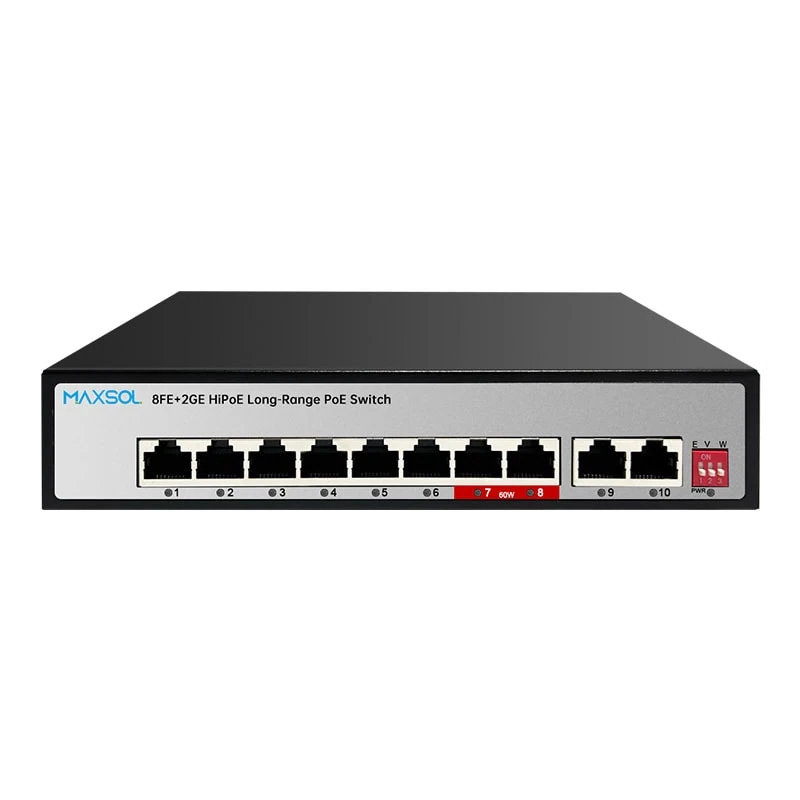
| PS1802GE | 8 Fast Ethernet | 2 Gigabit | 120W | Up to 60W on ports 7–8 | Small-to-medium camera groups needing Gigabit uplinks |
| PS11602FE | 16 Fast Ethernet | 2 Gigabit + 1 SFP | 200W | Up to 60W on ports 13–16 | Larger surveillance zones and fibre-uplink designs |
| PS12402FE | 24 Fast Ethernet | 2 Gigabit + 1 SFP | 300W | Up to 60W on ports 20–24 | Higher-density camera deployments and expansion planning |
Four-port option for a focused remote point
The PS1402E 4-port 300m long-range PoE switch has four Fast Ethernet PoE ports, two Fast Ethernet uplinks, a 65W budget, VLAN, watchdog, 300m long-range mode, and up to 60W on port 4.
This format can suit a small gate, entrance, perimeter segment, or local group of endpoints where four powered ports are sufficient. Its 65W budget still needs to be allocated carefully: one higher-power device can significantly reduce the remaining power available for other endpoints.
Eight-port option for growing camera groups
The PS1802GE 8-port 300m long-range PoE switch provides eight Fast Ethernet PoE ports, two Gigabit uplinks, a 120W PoE budget, and up to 60W on ports 7–8.
Gigabit uplinks are useful where several Fast Ethernet camera ports feed a recorder, aggregation switch, or network backbone. They do not increase the speed of every camera port, but they can help prevent the uplink from becoming the first bottleneck as camera traffic is aggregated.
Sixteen-port option for larger zones
The PS11602FE 16-port 300m long-range PoE switch includes 16 Fast Ethernet PoE ports, two Gigabit uplinks, one SFP uplink, a 200W budget, and up to 60W on ports 13–16.
This option is relevant when a site has a larger group of cameras and requires a choice between copper Gigabit uplinks and an SFP-based uplink. The SFP uplink may be considered as part of a broader fibre design, subject to selecting compatible optical components and verifying the overall network architecture.
Twenty-four-port option for dense deployments
The PS12402FE 24-port 300m long-range PoE switch has 24 Fast Ethernet PoE ports, two Gigabit uplinks, one SFP uplink, a 300W PoE budget, and up to 60W on ports 20–24.
It can be a practical starting point for dense camera areas, larger compounds, or designs with planned additions. However, 24 physical ports do not mean 24 high-power endpoints can be supported at their maximum demand simultaneously. Calculate the total load first.
Hi-PoE port allocation and power budgets
Higher-power-capable ports should be allocated deliberately. On the listed models, only certain numbered ports are specified as capable of supplying up to 60W:
- PS1402E: port 4
- PS1802GE: ports 7–8
- PS11602FE: ports 13–16
- PS12402FE: ports 20–24
Assign these ports to devices that genuinely need higher power, such as a compatible PTZ camera or another endpoint with a greater PoE requirement. Use regular PoE ports for fixed cameras with lower demand where suitable. This preserves higher-power capacity for the devices that need it.
Budget calculation example
Suppose a design has eight cameras with a planned maximum draw of 9W each and two PTZ cameras expected to reach 25W each:
- Eight fixed cameras: 8 × 9W = 72W
- Two PTZ cameras: 2 × 25W = 50W
- Planned endpoint demand: 122W
A switch with a 120W budget would be below the calculated endpoint demand before allowing any margin. In that situation, redesign the load distribution, use another power source for part of the system, select a higher-budget option, or reassess the true maximum device consumption. Do not assume a system will remain stable because its typical daytime load is lower.
Also consider what happens after a power interruption. If all cameras restart together, the switch must negotiate and supply power across the active endpoints. A design with adequate operating margin is generally more resilient than one operating close to its total budget.
Commissioning checklist
Use this checklist before handing over a long-range PoE camera installation.
Design and installation
- Record the actual cable route length for every extended run.
- Identify which endpoints need 300m Extend mode and which should remain in normal mode.
- Confirm the cable is suitable for PoE and the site environment.
- Check cable routing, containment, separation from electrical sources, and weatherproofing.
- Assign higher-power devices only to ports intended for their required power level.
- Add the maximum expected power draw of all powered devices.
- Confirm the combined load remains within the switch PoE budget with headroom.
- Confirm uplink capacity and whether copper Gigabit or SFP connectivity fits the network plan.
Functional tests
- Verify each camera receives power and stays online.
- Confirm video reaches the NVR or viewing client without recurring dropouts.
- Test the camera in day and night conditions, including IR activation where applicable.
- Operate PTZ, heaters, wipers, or other high-load functions where fitted.
- Check the stream quality and responsiveness at the link rate used in Extend mode.
- Test recording and simultaneous viewing where this is part of normal operation.
- Verify the switch’s VLAN and watchdog settings where these functions are used.
- Label switch ports, camera locations, cable routes, and high-power port assignments.
- Document measured cable lengths, expected endpoint loads, and final configuration.
Common mistakes to avoid
The most common error is treating “300m” as a blanket guarantee. Avoid enabling extended mode without checking the camera stream requirements, and do not use an extended copper link where the application needs more bandwidth than the mode can support.
Other frequent mistakes include placing a high-demand device on a standard PoE port, calculating only typical rather than peak power, overlooking IR or PTZ load, mixing poor-quality cable sections, and failing to protect exposed outdoor runs. A little time spent on cable testing and power planning prevents difficult fault-finding after installation.
FAQ
Can every IP camera run at 300 metres on PoE?
No. The reachable distance depends on the switch’s supported Extend mode, cable quality and length, endpoint power draw, data demand, terminations, and site conditions. Verify the complete link before committing to a 300m route.
Will a 300m PoE link support high-resolution cameras?
It may, but only if the camera’s actual bitrate and feature requirements fit within the link performance available in Extend mode. Higher resolution alone is not enough information; codec, frame rate, stream settings, analytics, and simultaneous access also matter.
Should I use long-range PoE or fibre for a remote camera?
Long-range PoE can be convenient for compatible low-to-moderate bandwidth endpoints where one copper run is practical. Fibre is often the stronger choice for greater distances, high bandwidth, electrical isolation, or routes with significant surge and interference risk. The best option depends on the site and system design.
How much power margin should I allow?
There is no single percentage that fits every project. Calculate the highest realistic operating draw of every endpoint, then keep enough spare budget for load variation, startup behaviour, and future changes. Avoid designing at the switch’s maximum stated power budget.
For a practical shortlist, compare the linked Maxsol models against your required port count, camera load, longest cable run, uplink plan, outdoor environment, and management requirements before finalising the design.